Multi-UE Simulation
7 minute read
A framework that runs many OAI UEs against a single OCUDU RAN gNB over ZMQ, with a software IQ-superposition proxy, per-UE Linux network namespaces, a per-UE traffic engine, and a terminal dashboard for control and monitoring.
Source code: github.com/OCUDU-India/openairinterface5g - the OAI 5G fork carrying multi_ue_sim/ (proxy, traffic engine, Rust ue-sim dashboard, helper scripts) alongside the standard nr-uesoftmodem UE.
Highlights
- N simultaneous UEs against one OCUDU RAN gNB over ZMQ, no RF hardware required.
- Software IQ superposition: a proxy fans the gNB downlink to every UE and sums the uplink from all UEs, emulating a shared air interface.
- Per-UE network namespaces: each UE gets its own tunnel, IP address, and routing, so traffic flows are isolated and independently measurable.
- Wave admission: UEs attach in configurable waves to keep the 5G CN authentication path from saturating.
- Per-UE traffic engine: idle, speedtest, video, and gaming patterns driven from the dashboard.
- Terminal dashboard (TUI): start/stop, live registration stages, throughput and RTT charts, log viewer, and runtime UE add.
- Scale roadmap: today’s runs sit comfortably in the tens of UEs on a single host; the framework is being extended to support 100 to 1000 simultaneous UEs through proxy sharding, multi-host UE fleets, and tighter CN admission control.
1. Prerequisites
1.1 Software
| Component | Version / Notes |
|---|---|
OAI nr-uesoftmodem |
Built from OCUDU-India/openairinterface5g (cmake_targets/nr-uesoftmodem) |
| OCUDU RAN gNB | Started separately |
| 5G CN | AMF/SMF/UPF + mysql subscriber database (Docker) |
| Python | 3.8+ with pyzmq and numpy |
| Rust toolchain | For building the dashboard (cargo, edition 2021) |
| Linux | Network namespace + iptables support; root access |
Install Python dependencies:
pip3 install pyzmq numpy
1.2 Build the dashboard
cd multi_ue_sim/dashboard
cargo build --release
# binary: multi_ue_sim/dashboard/target/release/ue-sim
2. Architecture Overview
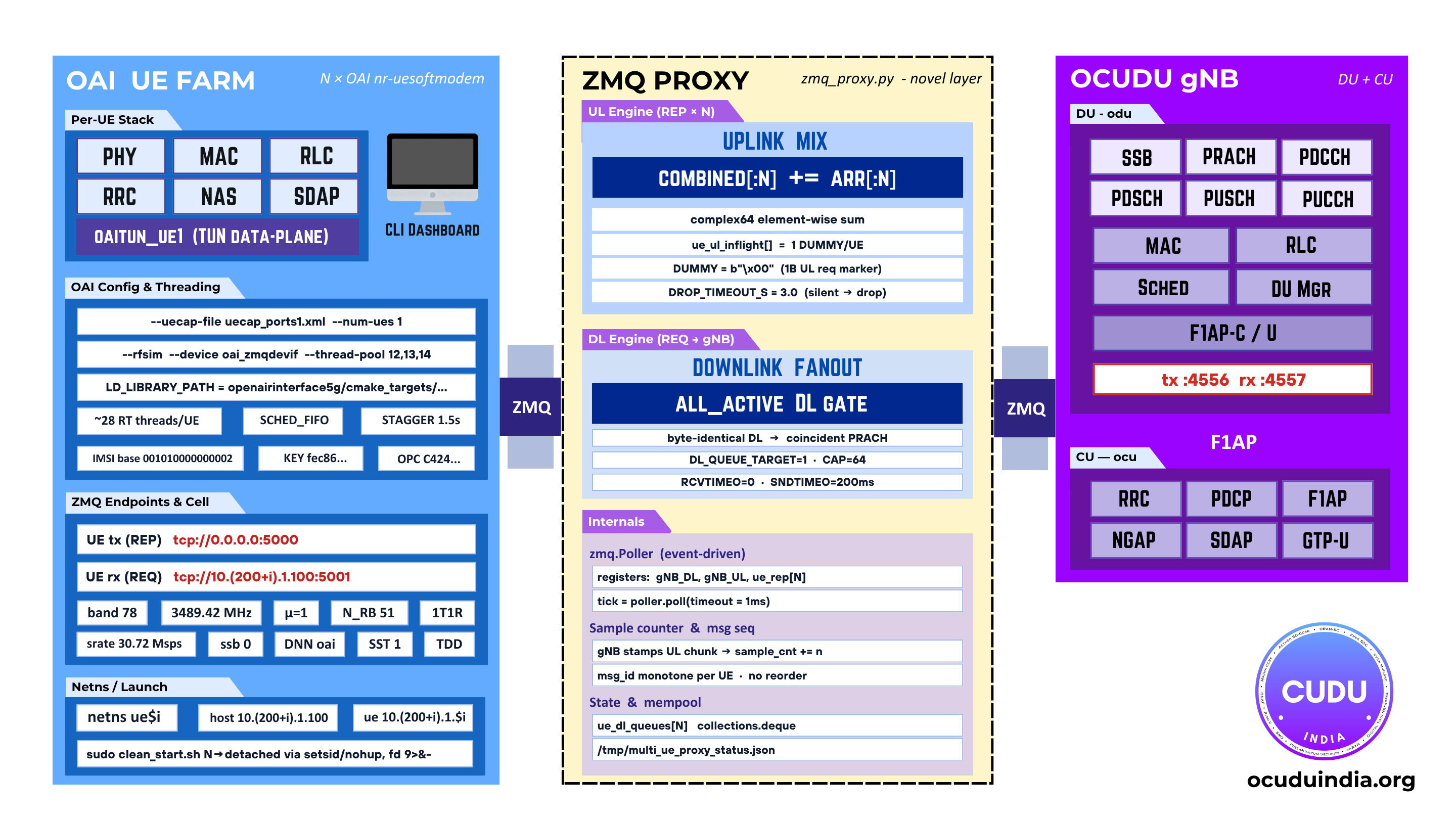
The system inserts a software proxy between the gNB’s ZMQ RF interface and N UE instances. The gNB sees a single RF front-end; the proxy fans its downlink to all UEs and superposes their uplinks.
ue1ue2ueNThe OCUDU RAN gNB exposes a single ZMQ RF front-end on :4556 (DL) / :4557 (UL). The proxy fans the downlink to every UE and superposes the per-UE uplinks back into a single summed stream. Each UE runs in its own Linux namespace (ue1 … ueN) with a dedicated tunnel; the per-UE traffic engine drives idle / speedtest / video / gaming patterns over those tunnels, and the ue-sim dashboard reads status and metrics from the proxy.
- Software proxy: with a real antenna, N UEs share one air interface and their signals superpose. The proxy reproduces this in software by copying the gNB downlink to every UE and summing all UE uplinks into one stream sent back to the gNB.
- Network namespaces: each UE runs in its own namespace (
ue1…ueN) with a dedicated IP and routing, so per-UE throughput and latency can be measured without cross-talk. - Wave admission: the 5G CN authentication path can only handle a few attaching UEs at a time. The proxy admits UEs in configurable waves (
PROXY_WAVE_SIZEUEs everyPROXY_WAVE_DELAY_Sseconds) to spread the load.
2.1 Scaling roadmap
Today’s verified runs cover the tens-of-UEs range on a single host. The framework is being extended to support 100 to 1000 simultaneous UEs in two stages:
- Single-host fleet (target: ~100 UEs). Tighter wave admission, pinned per-UE CPU sets, batched RX/TX in the proxy, and an in-process metrics aggregator so the dashboard scales with UE count instead of polling each one.
- Multi-host fleet (target: ~1000 UEs). A sharded proxy fans the gNB downlink across multiple UE-host servers connected over a dedicated NIC; each shard owns its UE subset and superposes locally before contributing to the gNB-side uplink sum. The dashboard merges per-shard metrics over the wire.
Both stages keep the same gNB-side contract (one ZMQ DL / UL pair) so OCUDU RAN runs unchanged regardless of UE count.
3. Demo
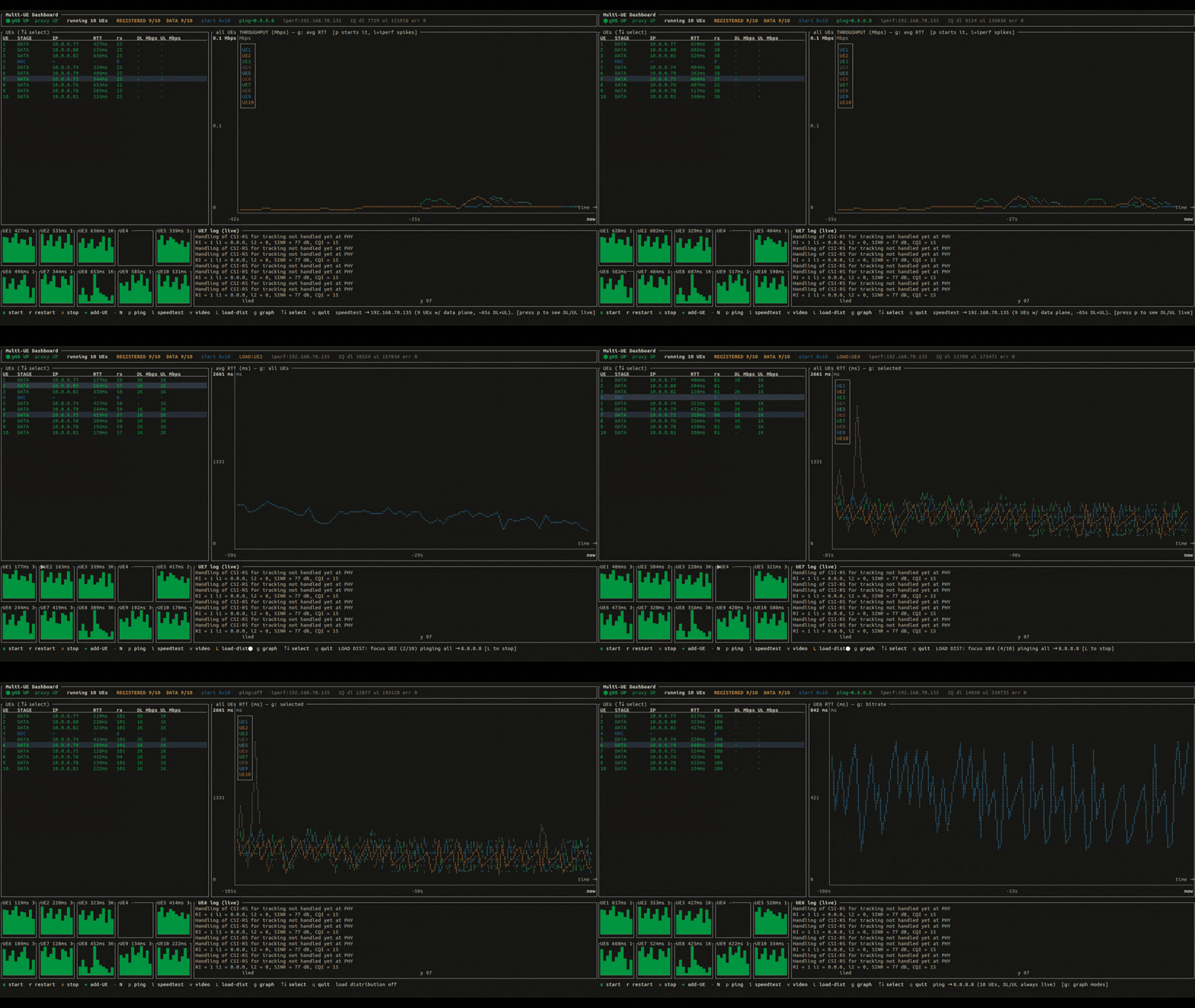
ue-sim dashboard driving multiple UEs through attach and data traffic.4. Components
| Component | File | Role |
|---|---|---|
| ZMQ proxy | proxy/zmq_proxy.py |
DL fan-out, UL superposition, wave admission |
| Traffic engine | traffic/ue_traffic.py |
Per-UE traffic patterns and metrics |
| Config generator | config/gen_ue_config.py |
Generates per-UE UE config |
| UE launcher | run_nue.sh |
Creates namespaces, starts proxy + N UEs + traffic engine |
| Live UE add | mue_add.sh |
Provisions and launches one extra UE at runtime |
| Stack starter | clean_start.sh |
Optional one-command gNB + UE bring-up |
| Status report | check_nue.sh |
Per-UE registration stage table |
| Subscriber provisioning | provision_subscribers.sh |
Bulk-inserts IMSIs into the 5G CN database |
| Dashboard control | dash_ctl.sh |
stop / restart actions invoked by the dashboard |
| Dashboard (TUI) | dashboard/src/main.rs |
Rust terminal UI + CLI (ue-sim) |
5. Configuration
Most behaviour is controlled by environment variables with sensible defaults. No code changes are required for normal use.
| Variable | Default | Description |
|---|---|---|
IMSI_BASE |
001010000000002 |
First IMSI; increments per UE |
N_RB |
51 |
Resource blocks (51 = 20 MHz, 24 = 10 MHz, 106 = 40 MHz) |
STAGGER_S |
1.5 |
Seconds between launching successive UEs |
UE_CPUS |
unset | CPU affinity for UEs/proxy, e.g. 25-31 |
PROXY_WAVE_SIZE |
1 |
UEs admitted per wave |
PROXY_WAVE_DELAY_S |
20 |
Seconds between admission waves |
GNB_DL_PORT |
4556 |
gNB DL ZMQ port (readiness probe target) |
IPERF_SRV |
unset | iperf3 server IP for traffic tests |
LOGDIR |
multi_ue_sim/logs |
Where UE/proxy/traffic logs are written |
6. Running Guide
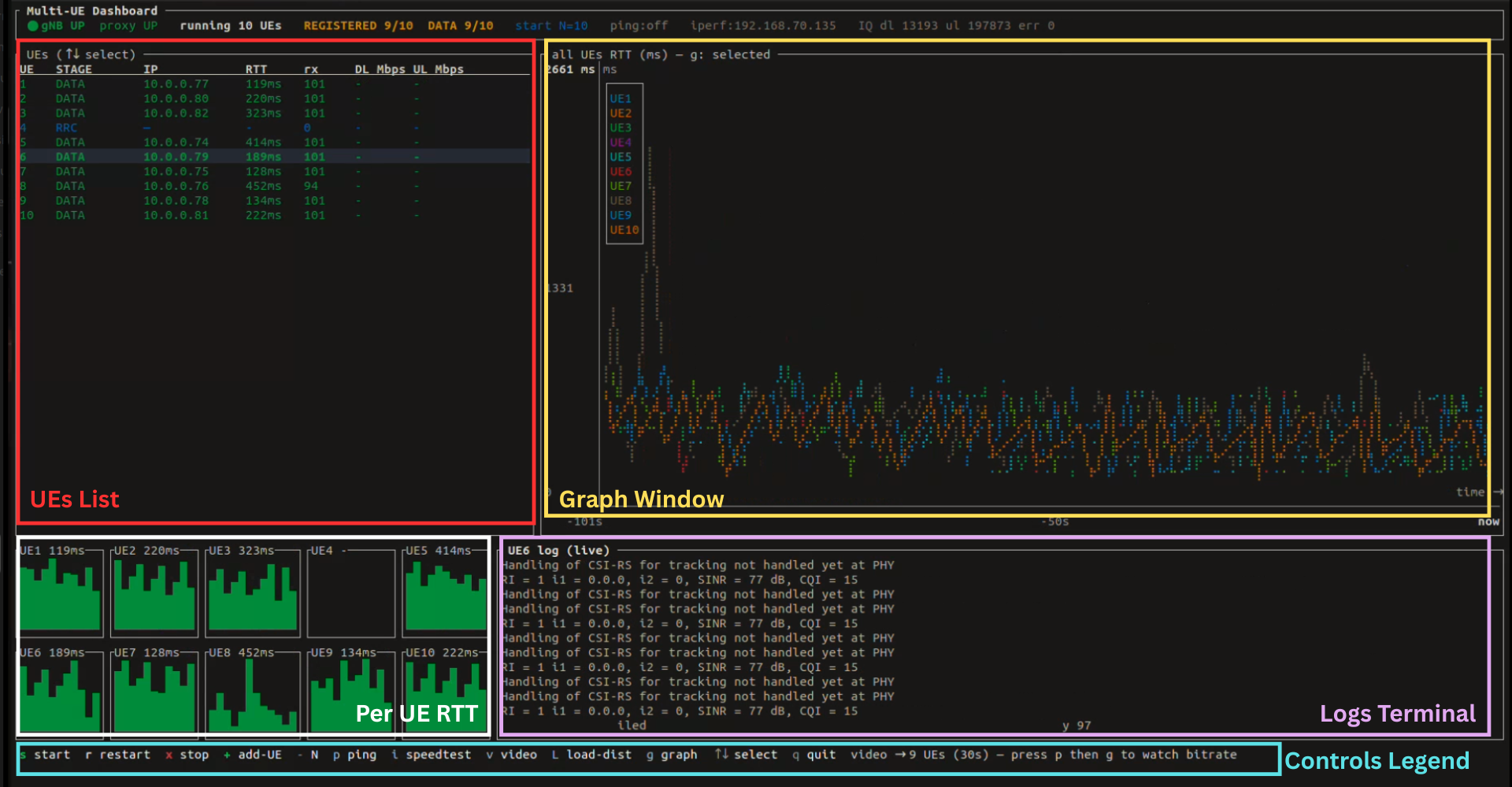
ue-sim dashboard running N UEs.6.1 Provision subscribers (once)
cd multi_ue_sim
bash provision_subscribers.sh 10          # insert 10 IMSIs
bash provision_subscribers.sh 10 --list   # verify
6.2 Start the gNB
Start your OCUDU RAN gNB manually. The dashboard will show gNB UP once it is reachable.
6.3 Open the dashboard
./dashboard/target/release/ue-sim monitor
Optionally set the UE count:
./dashboard/target/release/ue-sim monitor --num-ues 10
6.4 Start UEs and watch them attach
Inside the dashboard:
- Press
sto start the UEs (the gNB must showUP). - Watch the Status column advance:
SYNC->SIB1->RAR->RRC->REGISTERED->DATA. - Once a UE reaches
DATAit has a tunnel IP and can carry user traffic.
6.5 Run a traffic test
-
Export the iperf3 server IP (the external data network container):
export IPERF_SRV=<ext-dn container IP> -
Press
ifor a speed test orvfor a video pattern. -
Press
pto enable ping, thengto cycle the chart to the throughput/RTT view.
6.6 Add a UE at runtime
Press + while UEs are running. A new UE is provisioned, launched, and joins the simulation automatically.
6.7 Stop
Press q or Esc to quit the dashboard. This stops all UEs and the proxy and cleans up the namespaces. Your gNB is left running.
7. Keyboard Reference
| Key | Action |
|---|---|
s / r |
Start / restart N UEs |
x |
Stop all UEs and proxy |
+ / - |
Add a UE live / adjust count before start |
p |
Toggle ping (RTT) on all UEs |
i |
Speed test (iperf3 TCP DL+UL) |
v |
Video traffic pattern |
l / L |
Load distribution (ping all, rotate focus) |
g |
Cycle chart metric (Avg RTT / All RTT / Selected RTT / Bitrate) |
Tab |
Cycle log source |
Up / Down |
Select UE |
PgUp / PgDn |
Scroll log |
End |
Jump to live tail |
q / Esc |
Quit (stops UEs, cleans namespaces) |
8. CLI Reference
The same binary works headless without the TUI:
# Start 5 UEs in the background
sudo ./dashboard/target/release/ue-sim start --num-ues 5

# One-shot status table
./dashboard/target/release/ue-sim status

# Set a traffic pattern on a single UE
./dashboard/target/release/ue-sim traffic 3 speedtest

# Tail a log
./dashboard/target/release/ue-sim logs --source proxy --follow

# Stop everything
sudo ./dashboard/target/release/ue-sim stop
9. Directory Layout
multi_ue_sim/
├── dashboard/                  # Rust TUI + CLI (ue-sim)
├── proxy/                      # DL fan-out / UL superposition proxy
├── traffic/                    # per-UE traffic engine
├── config/                     # per-UE config generator
├── docs/                       # documentation + screenshots
├── logs/                       # UE / proxy / traffic logs (gitignored)
├── run_nue.sh                  # launch N UEs + proxy + traffic engine
├── mue_add.sh                  # add one UE at runtime
├── clean_start.sh              # optional full-stack starter (gNB + UEs)
├── check_nue.sh                # registration status table
├── provision_subscribers.sh    # bulk-provision IMSIs into 5G CN DB
└── dash_ctl.sh                 # stop / restart helper used by the dashboard
10. Source
The framework lives in the OCUDU India OAI fork:
- Repository: github.com/OCUDU-India/openairinterface5g
- Path in tree:
multi_ue_sim/(proxy, traffic engine, dashboard, helper scripts) - UE binary:
cmake_targets/nr-uesoftmodem(standard OAI 5G UE, built from the same tree)
Clone and check out:
git clone https://github.com/OCUDU-India/openairinterface5g.git
cd openairinterface5g/multi_ue_sim
Build the OAI UE binary and the Rust dashboard as covered in Sections 1.1 and 1.2.